Freelance web developer
Make maintenance work visible.
The client sees an invoice, not the work behind it. Send a report that shows what was checked, what you changed and which fixes a rescan confirmed.
 NeoShield
Scan Free
For freelance developers, WordPress maintenance providers, small agencies and MSP teams
Assess authorized websites, explain the evidence, provide platform-specific remediation, and document whether each correction was confirmed by a rescan.
Free plan: 1 website, 1 scan per month · Email sign-in, no card
Only for websites you own or may assess · Passive checks of public pages and DNS · No exploitation, login testing, brute force, fuzzing or load testing
Website security report
Passive Public-Configuration Score · 3 review recommendations pending
This score measures only the passive and authorized checks completed during this assessment. It is not an overall website-security rating or penetration-test result.
0 confirmed findings · 3 review recommendations · 4 informational observations · 32 checks passed · coverage 44 of 45 applicable checks
+ 2 more informational observations
Real scan of NeoShield’s own website, 2 Nov 2026.
Only confirmed findings (CF-) reduce the score. Review recommendations (RR-) and informational observations (IO-) do not. The score covers publicly observable configuration only; it is not a penetration test, a certification or a measure of overall security. Scoring model 2026.08-d. How the score works
Report vs_d74d7c310573965e193d2c1b
35-second tour
See how a NeoShield report answers “Is our website secure?” with evidence instead of a guess: scan, explain, fix and verify.
Step 2 shows a real scan of NeoShield’s own website. Steps 3 and 4 use the sample report’s demonstration data.
Pages from the complete sample report and its PDF. Demonstration data, not a customer’s website.
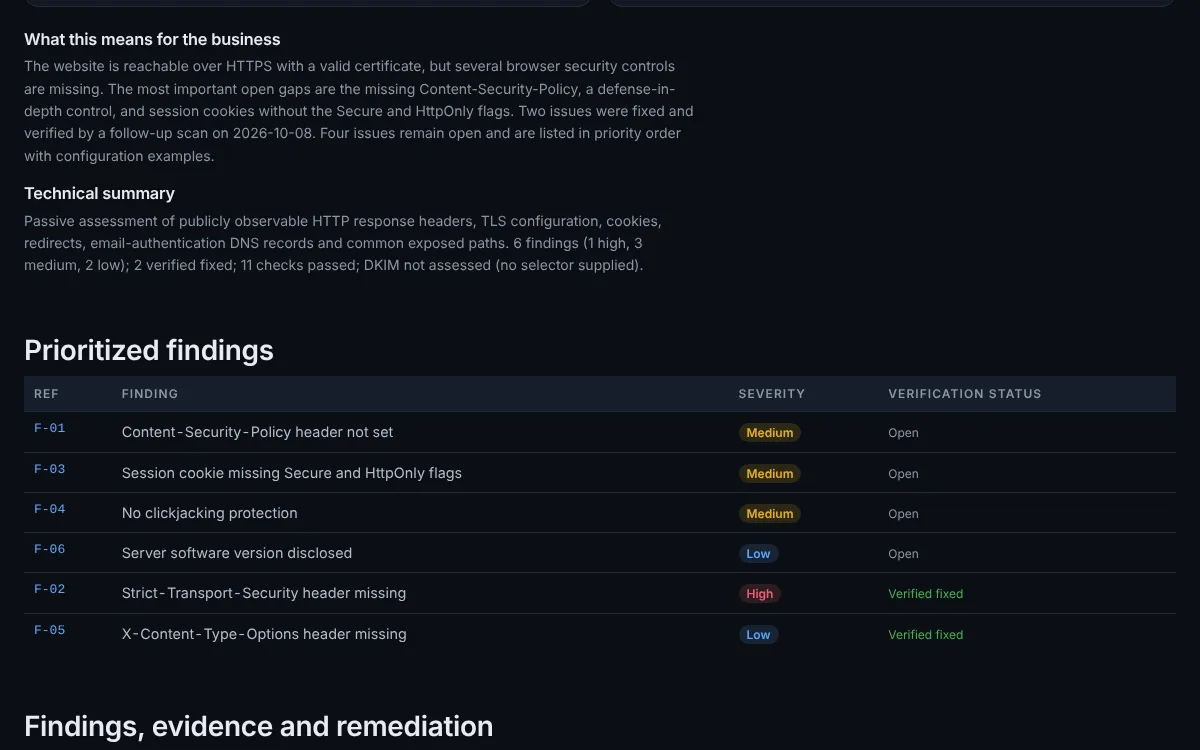
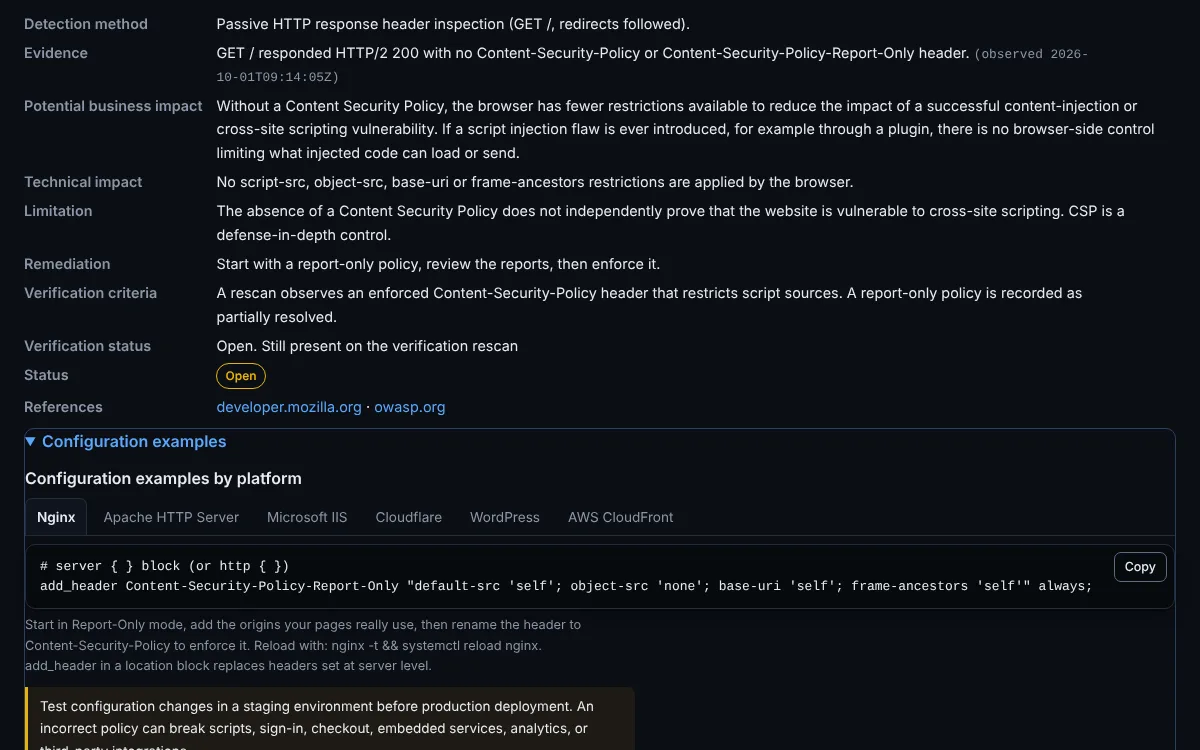
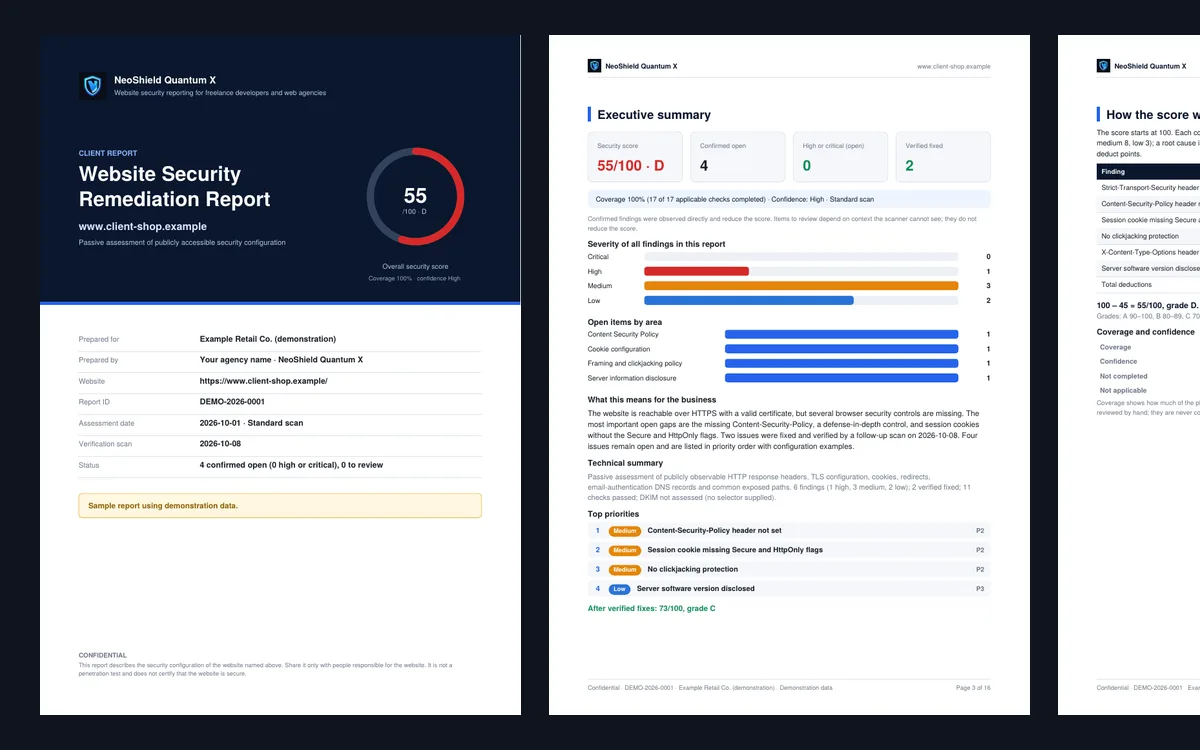
Show what was observed, where it was found, how severe it is, and why it matters in language a client can follow.
Provide platform-specific starting points for Nginx, Apache HTTP Server, Microsoft IIS, Cloudflare, WordPress, and AWS CloudFront when applicable.
Rescan after deployment and record each finding as resolved, partially resolved, still observed, or unable to verify.
People who look after other people’s websites and need to show that the work was done.
Freelance web developer
The client sees an invoice, not the work behind it. Send a report that shows what was checked, what you changed and which fixes a rescan confirmed.
WordPress maintenance provider
Attach a report per website to the monthly update, with WordPress fix steps and scheduled scans that flag a setting that changed after a plugin or hosting update.
Small web agency
Each finding carries a plain explanation for the client and a platform fix for the developer, so nobody rewrites the same advice for every website.
Small MSP team
Monitor client websites as often as daily on MSP / Team (early access), with report history per website and up to 5 users.
One finding from the sample report: what was observed, how to explain it, the fix for the client’s platform, and the rescan that confirms it. Demonstration data
CF-02 High
Configuration for the client’s platform
# server { } block (or http { })
add_header Strict-Transport-Security "max-age=300" always;
Reload with: nginx -t && systemctl reload nginx. add_header in a location block replaces headers set at server level.
# Requires mod_headers (a2enmod headers)
Header always set Strict-Transport-Security "max-age=300"
Place in the VirtualHost or .htaccess, then run apachectl configtest and reload.
<!-- IIS 10 (version 1709+): applicationHost.config, inside the <site> element for this website -->
<!-- Stage 1: five minutes. Raise max-age in stages (see the rollout steps). -->
<hsts enabled="true" max-age="300" includeSubDomains="false" redirectHttpToHttps="true" />
Native HSTS support is available from IIS 10 version 1709. On older versions, add the header with customHeaders.
SSL/TLS > Edge Certificates > HTTP Strict Transport Security (HSTS) > Enable HSTS
1. Max Age: start with the shortest value offered
2. Include subdomains: off for now; turn on only when every subdomain serves HTTPS
3. Preload: off
4. Save, then raise Max Age in stages
Cloudflare does not offer five minutes, so the first stage is longer than on your own server. Make sure HTTPS works everywhere before enabling it.
<?php
// In a small site-specific plugin (or the child theme's functions.php)
add_action( 'send_headers', function () {
    header(
        "Strict-Transport-Security: "
        . "max-age=300"
    );
} );
Setting the header in the web server or CDN is preferred; use this when you only control WordPress.
CloudFront > Policies > Response headers > Create response headers policy
1. Security headers > Strict-Transport-Security: max-age 300 (raise in stages), includeSubDomains off
2. Origin override: enabled
3. Attach the policy to the distribution's cache behavior(s)
Changes propagate to all edge locations within a few minutes.
Starting points, not finished changes: AI-assisted and template guidance can be incomplete or wrong. Review and test in staging before production.
Verified fixed by a rescan on 8 Oct 2026
A finding is marked resolved only when a scan confirms it, and it reopens automatically if it comes back. Demonstration data.
One repeatable workflow for every client website you manage.
Confirm you own the website or have permission to assess it. Nothing runs before this.
A passive check of public pages and DNS: HTTPS, TLS, security headers, cookies, exposed files, SPF, DMARC and security.txt.
Findings are ordered by priority, each with the evidence observed and why it matters.
Send the client a readable report and the developer the fix for their platform. PDF reports on paid plans.
After the fix is deployed, Verify Fix rescans and records each finding as resolved, partly resolved, still observed or unable to verify. Paid plans.
Scheduled scans flag a fixed setting that comes back: weekly on Pro, up to daily on MSP / Team.
Not a penetration test, a professional security audit, a compliance audit or a certification. A clean result does not prove a website has no vulnerabilities. Coverage and limitations
Included with Pro and MSP / Team
Both assistants reply in English or in Japanese. Answers are drafts for a person to review, sized to the evidence you give, and limited to defensive security.
AI SOC Copilot Labs
Paste sanitized alert fields or a score breakdown. The copilot separates what the evidence shows from what it does not, lists possible causes and gives one next step. With no evidence it gives a short answer and asks for what it needs instead of guessing.
Try asking “Why did the risk score increase?”
AI Security Consultant Labs
Describe your organization, or start with nothing. You get a baseline plan right away, with stated assumptions and up to five questions to tailor it, aligned with NIST CSF 2.0 and NIST SP 800-61 Rev. 3.
Try asking “How do I get incident-response ready, including a tabletop exercise plan?”
AI output is advisory and needs human review. It is not legal advice, does not confirm a compromise, and does not run queries or change your systems. The text of questions and answers is not written to logs. Compare plans
Prepaid passes for 30 or 365 days. No automatic renewal.
¥0
1 website · 1 manual scan per month · up to 3 medium-severity findings in full per scan · 1 user
¥1,980 / 30 days
Up to 5 monitored websites · 100 manual scans per month · weekly monitoring · 1 user
¥7,980 / 30 days
Up to 25 monitored websites per included user · 100 manual scans per month · monitoring as often as daily · 5 users
Planned: Separate client workspaces with per-client access, Agency logo branding on reports, Monthly executive summaries
SecurityHeaders, Qualys SSL Labs and MXToolbox are useful at the test each one runs, and SSL Labs tests TLS in more depth than NeoShield. Keep using them. NeoShield adds the work around the checks: one report a client can read, fixes for the client’s platform, verification of each fix, and history per website.
| Feature | SecurityHeaders | SSL Labs | MXToolbox | NeoShield |
|---|---|---|---|---|
| Security checks | HTTP security headers | TLS and certificates, in depth | DNS, mail server and blocklist lookups | Headers, TLS, cookies, exposed files, SPF and DMARC in one report |
| Client-ready report | Results page | Results page | Results page | PDF reports a client can read (Pro, Team) |
| Remediation guidance | Header explanations | Ratings and protocol detail | Problem descriptions | Fix steps for Nginx, Apache, IIS, Cloudflare, WordPress and CloudFront |
| Fix verification | Run the test again and compare by hand | Run the test again and compare by hand | Run the test again and compare by hand | Verify Fix records each finding as resolved, partly resolved or still present |
| Monitoring | Not part of the free test | Not part of the free test | Sold separately for DNS and email | Scheduled scans that flag regressions (Pro, Team) |
| Report history | Not organized by client website | Not organized by client website | Not organized by client website | The 100 most recent reports per account, by website |
| Agency workflow | One check, one website at a time | One check, one website at a time | One check, one website at a time | Client list, Security Center and shared seats (Team) |
| Price | Free | Free | Free lookups; paid plans for monitoring | Free plan; Pro ¥1,980 per 30 days |
Based on the public free versions of each tool as of November 2026. Product names belong to their owners; NeoShield is not affiliated with them. Use them alongside NeoShield. If something here is out of date, tell us and we will correct it. Report a correction
A new product, launched in 2026. Customer stories and usage figures will appear only when they are real and approved.
No. NeoShield checks publicly observable configuration on websites you are authorized to assess: HTTPS and TLS, security headers, cookies, server disclosure, commonly exposed files, SPF, DMARC and security.txt. It does not exploit, log in, brute force, fuzz or load test, and it does not review source code or internal systems. It is not a professional security audit, a compliance audit or a certification, and a clean result does not prove a website has no vulnerabilities.
Only websites you own or have permission to assess, such as client websites covered by your service agreement. You confirm this before every scan and every recurring schedule.
One website and one manual scan per month. Every finding is named, with its severity, affected host, basic evidence and why it matters, and up to three medium-severity findings are shown in full. Complete evidence, platform-specific fixes, exports, Verify Fix, history and monitoring are part of the paid plans.
Paid plans export each report as a PDF that you can share with a client or developer, with optional "Prepared for" and "Prepared by" names. Reports carry NeoShield branding today. Agency branding is planned.
After the fix is deployed, run Verify Fix on the report (Pro and MSP / Team). NeoShield scans the same website again and records an outcome for each finding: resolved, partially resolved, still present, or unable to verify. A finding is only marked resolved when a scan confirms it, and it reopens automatically if it comes back.
No. Paid access is currently sold as prepaid passes for a fixed period (30 or 365 days) with no automatic renewal. When the period ends, the account returns to the Free plan unless you buy another pass.
NeoShield is operated from Japan. Support is by email only, with no live chat, phone or SLA; Pro replies aim for two business days. Scans, scheduled monitoring and payments run automatically, so they do not wait for a support reply.
Start with one website you are authorized to assess, or read the full sample report first.
Free plan: 1 website, 1 scan per month · Email sign-in, no card
Only for websites you own or may assess · Passive checks of public pages and DNS · No exploitation, login testing, brute force, fuzzing or load testing